 Daylane
Tomorrow's deliveries, planned in a minute.
Daylane learns your storages, vehicles and rules once. After that it plans hundreds of orders a day in about a minute, at the quality a classic solver needs ten minutes for.
One day: 611 orders, 36 vehicles, 3 storages. Planned in 59 seconds.
This is an actual plan from our server, on OpenStreetMap. Click any stop: every order has its own delivery hours, weight, volume, dimensions and goods type, and every vehicle its own shift, capacity and equipment. The planner respects all of them at once.
Add your own attributes, as many as you need
Requirements are plain labels: an order asks for one, a vehicle type has it. Goods types, pairs that must never travel together and restricted zones with hours work the same way. There is no limit on how many you define.
Examples. A new kind of rule, not just a new label, is added on request.
At this scale, a classic solver stalls
611 orders, 36 vehicles and a dozen kinds of rules allow more plans than anyone can enumerate, and every added rule makes the search harder. In our test an off-the-shelf solver was still 4.9% from the best plan after 10 minutes, and two of its runs on the same day differed by about 2%.
A customer calls at 13:00. You answer before they hang up.
Send the late order to Daylane and get a yes or no in about a second: which vehicle takes it, when it picks the goods up at the storage, when it delivers, and what it adds to the cost of the day.
- Quote first, commit when the customer says yes
- The vehicle may return to its storage to pick the order up
- Nothing already delivered or under way is changed
- A refusal comes with the reason, and the plan stays as it was
New order, north storage, deliver today
✓ Accepted
- Vehicle
- north-car-9
- Pick-up at storage
- 14:02
- Delivery
- 14:27
- Added cost
- +8.23of an order worth 40
The example is a real answer from our server. Daylane inserts the order into the existing routes; it does not yet rearrange the rest of the day to make room. Times assume vehicles are running to plan.
The same plan quality. One minute instead of ten.
Both lanes stop at the same plan quality: about half a percent from the best plan found. Only the time differs.
Your fleet doesn't change every morning. Only the orders do.
Planning from zero, every day
- Starts from nothing each morning, as if it had never seen your fleet
- Ten minutes or more for a good plan of 600 orders
- Two runs on the same day differ by about 2%
- Works on simplified rules, then patches the plan afterwards
- A late order change means waiting again
Daylane
- Learns what stays the same: storages, vehicles, shifts, rules
- About one minute for the same plan quality
- Every test day within 1.5% of the best plan found
- Every rule is checked exactly on every plan, by an independent validator
- Re-plan in a minute when orders change
Three steps. Past data is optional.
Describe your fleet
Storages, vehicle types and their limits, shifts, goods rules, city zones. Upload a JSON file or call the API.
We learn your days
You can plan from day one without it. Once 40 days exist, uploaded from your history or collected as you plan, we train a model for your setup and test it on days it has never seen. It is used only if it wins.
Send orders, get routes
One call in, one call out: every vehicle's stops in order with arrival times, and the orders that could not be served.
One plan, three people who need it
More orders delivered by the same fleet
The pilot measures the gain on your own past days before you commit to anything.
The plan is ready before the coffee is
Every vehicle's route on the map, with load, shift and arrival times. Change the orders and plan again in a minute.
Two API calls a day
OAuth 2.0, one JSON in, one JSON out. Nothing changes for drivers or for your order system.
Real rules, enforced exactly
The model only narrows the search. It never decides what is allowed, so a wrong guess can cost seconds but never a broken route.
Decide how the work is spread over your vehicles
The same orders can be planned in different ways. Choose a default for your fleet and change it for any single plan. Every rule is still enforced.
Best result for the target
No preference: Daylane spreads orders however it delivers the most.
About the same number of orders per vehicle
For teams paid per stop, or when every driver should get a comparable day.
As many orders per vehicle as possible
Fill vehicles and leave the rest at the storage, giving up almost no orders.
Every vehicle on the road earns its keep
Fewer vehicles and more value on each. A few low-value orders may stay undelivered.
Figures from one test day with 300 orders and 36 vehicles available, 40-second plans. On days with more orders than the fleet can carry, the strategies differ less.
What would one minute a day be worth to you?
A rough estimate from our benchmark. The pilot replaces it with numbers measured on your own days.
Measured, not promised
25 days the model never saw, 4 runs per method and day, every plan validated. The baseline is PyVRP, a state-of-the-art open-source solver.
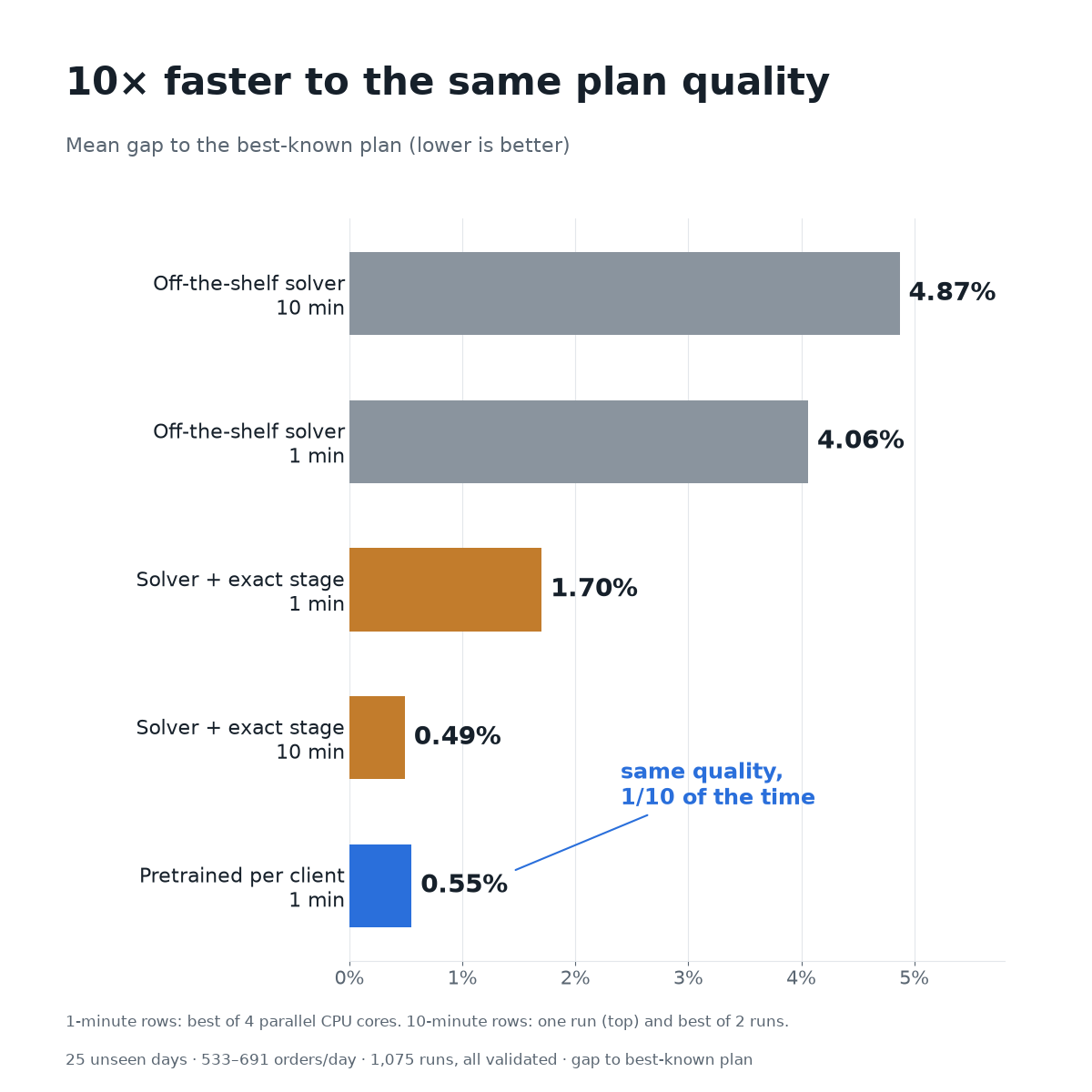
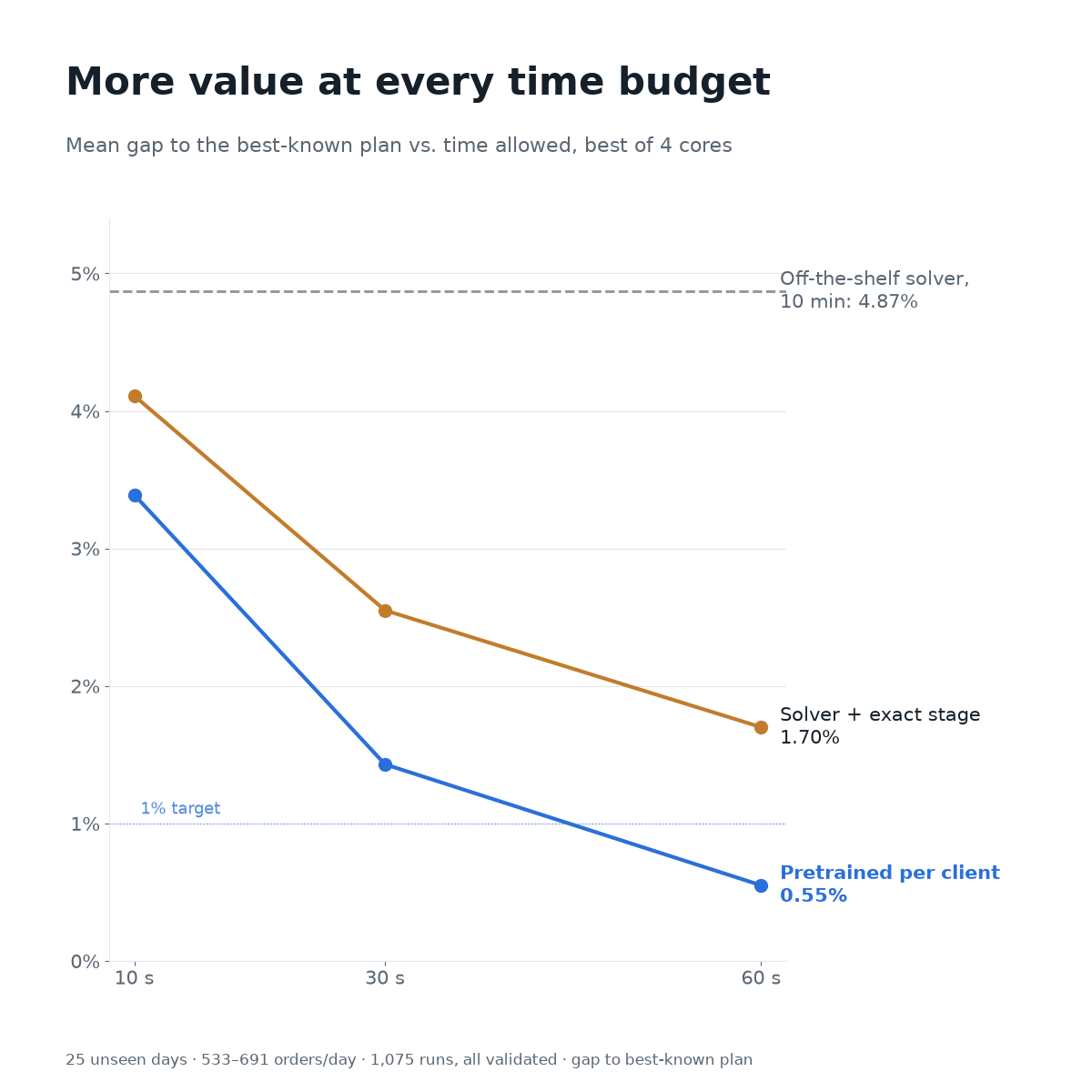
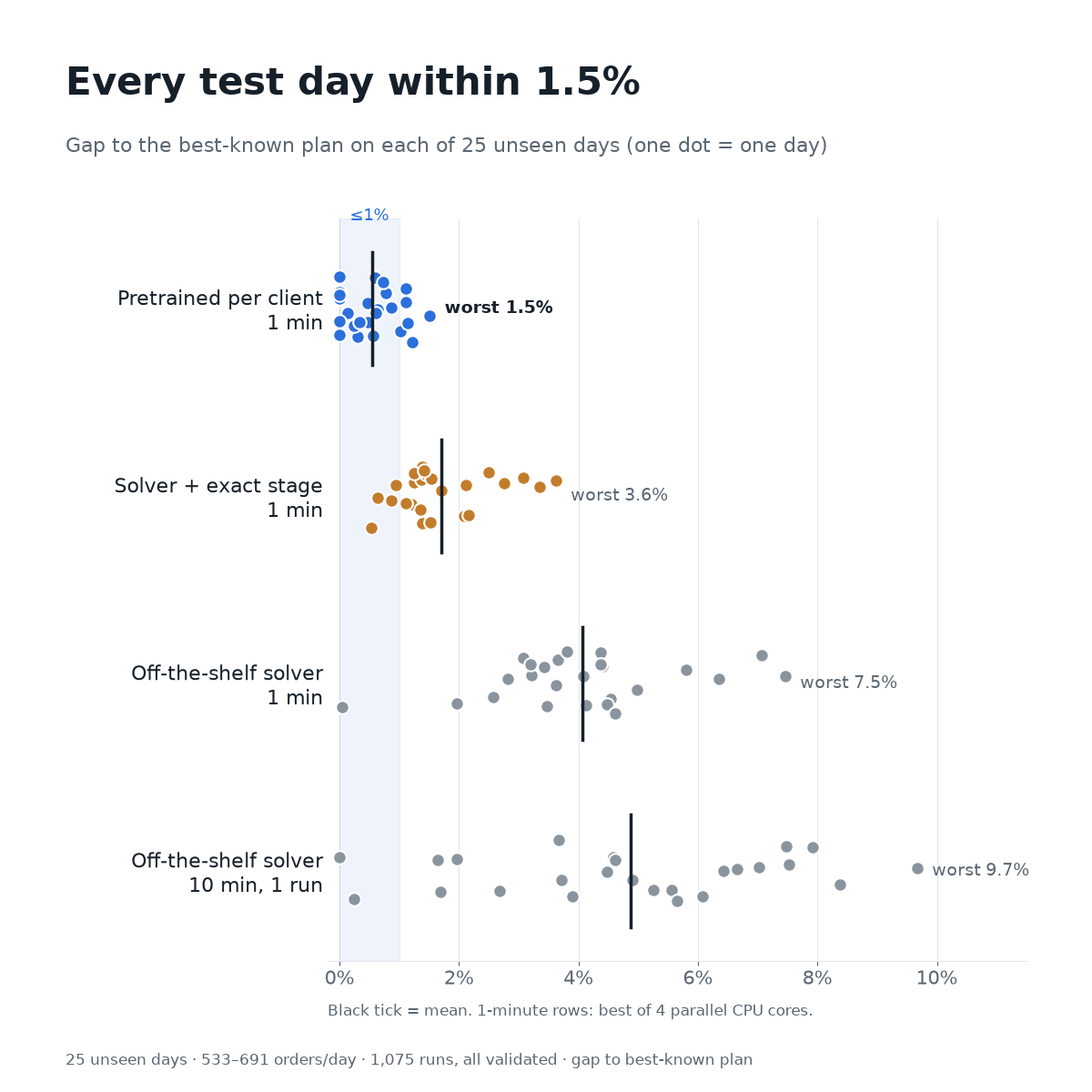
Gaps are measured against the best plan any method found, not a proven optimum. Real road network (4,000 Moscow addresses), synthetic orders, one client configuration. One-minute figures use 4 CPU cores.
Two calls a day
Connect Daylane to your ERP or TMS. The full OpenAPI description is shared with your API credentials.
- OAuth 2.0 client credentials; your workspace is fixed in the token
- A model is refused if your setup changed since it was trained
- Plans are asynchronous: start one, then fetch the routes
- Late orders: a quote in about a second, then commit
- Moscow road network today; other regions on request
# every morning
POST /api/v1/setups/{id}/daily
{ "date": "2026-11-19", "orders": [ … ] }

# about a minute later
GET  /api/v1/setups/{id}/daily/2026-11-19
→ { "status": "done",
    "kpis": { "orders_served": 564, "km": 2768 },
    "routes": [ { "unit_id": "north-van-1",
                  "stops": [ … ] } ] }
Open the demo. No sign-up.
A shared workspace with a real fleet, 47 days of orders and a trained model. Plan a day, look at the routes on the map, send a late order.
The demo account can plan days, add late orders and read everything. It cannot change the fleet, train models or reach the admin functions. The workspace is shared, so you may see other visitors' plans; it is reset from time to time.
Questions people ask first
What do you need from us to start?
Only a description of your fleet and rules, and the day's orders with coordinates. You get plans from day one. Time windows, sizes, goods classes and equipment needs are optional.
Do we have to upload past orders?
No, that is optional. Without history, your days are planned by the classic solver. The model that makes planning about 10× faster needs 40 days: upload them from your history to get it the same day, or just keep planning and train it once 40 days have collected.
How long does training take?
Usually 30 to 60 minutes for 40 days. Most of that is solving your past days; the training itself takes under a minute on a GPU.
What happens when our fleet changes?
Daylane notices. A model trained on the old setup is not used; your days are planned by the classic solver, about 1.5% lower in value, until the model is retrained. Price changes don't need retraining.
Does the model decide the routes?
No. It tells the solver where to look. Every plan is checked against all your rules by an independent validator before it is returned.
Can we optimise for the number of deliveries instead of money?
Yes. Each setup has a target: money (order value minus route costs) or orders (as many delivered as possible).
Can we add orders during the day?
Yes. Send the late order and Daylane answers in about a second whether a vehicle can still take it, with pick-up and delivery times and the added cost. The vehicle may return to its storage for the goods; nothing already delivered or under way changes. It inserts into the existing routes and does not yet rearrange the rest of the day.
Which cities do you cover?
Moscow today. Other regions need their road data loaded; ask us.
Who can see our data?
Only your workspace. Your orders are used to plan your days and to train your own model, and are never mixed with another client's.
Plan tomorrow in a minute
Request access, describe your fleet and plan your first day. Add past days whenever you want the model.